




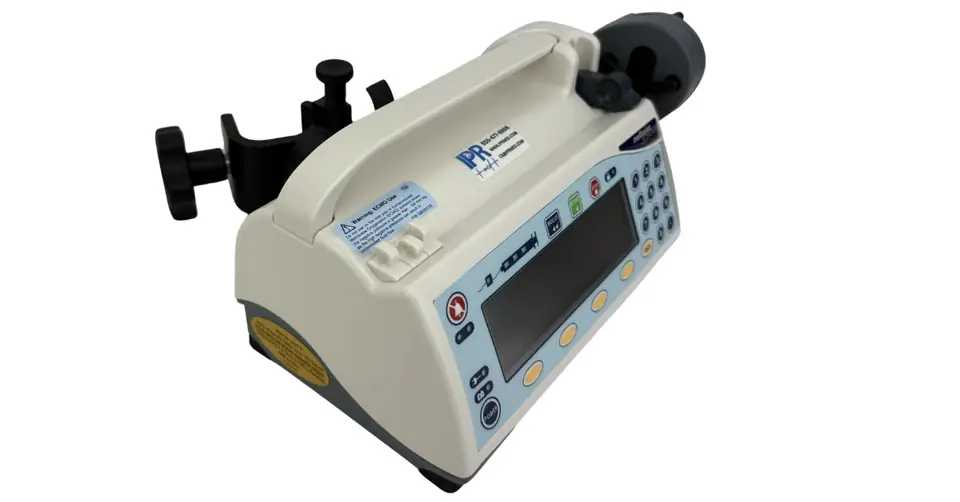
Medfusion 3500 Manuals and Documentation: Operator’s Manuals, Brochure and Specifications
Last reviewed October 16, 2026
You can download the Medfusion 3500 Version 6 Operator’s Manual, the earlier operations manual (software starting with 3.0.x) and the original product brochure free from this page. Pick the manual that matches the software version shown on your pump’s start-up screen.
Biomedical teams, nurses and buyers all end up looking for the same Medfusion 3500 documents. We keep them in one place, explain which one matches which pump, and pull out the reference details people ask us about most.
Download the Medfusion 3500 Manuals
Version 6 Operator’s Manual
The full operator’s manual for Medfusion 3500 pumps running Version 6 software, including PharmGuard, alarms, syringes, cleaning and specifications.
Download PDFEarlier Operations Manual
The operations manual for pumps running software starting with Version 3.0.x, with alarms and remedies, delivery modes, power, care and syringe flow rate appendices.
Download PDFProduct Brochure
The original Smiths Medical brochure with the pump’s headline specifications, FlowSentry and PharmGuard features, and connectivity options.
Download PDFWhich Medfusion 3500 Manual Do You Need?
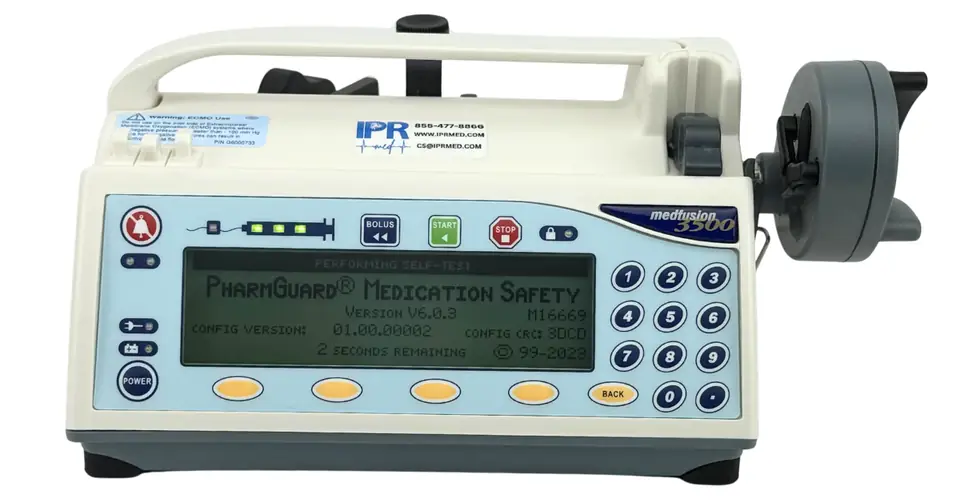
Every Medfusion 3500 looks nearly the same from the outside, so the manual has to match the software, not the case. Turn the pump on and read the start-up screen. It shows the installed software version during the self-test.
| Start-up screen shows | Use this manual |
|---|---|
| Version 6 software (V6.x) | Version 6 Operator’s Manual |
| Earlier software, starting with 3.0.x | Earlier operations manual |
The software version also determines a pump’s FDA recall status. Versions 3, 4 and 5, and Version 6 pumps on v6.0.0 or v6.0.1, are covered by Class I recalls. Our Medfusion 3500 recall and software versions guide explains what each version means for your fleet.
What’s Inside the Version 6 Operator’s Manual
The Version 6 manual runs to about 145 pages. Here is where to find what you need.
| Section | What it covers | Starts on page |
|---|---|---|
| Important safety information | Warnings, cautions and symbols | 1 |
| Pump customization and programming | Custom configurations, Quick Libraries, PharmGuard dose protocol protection, PharmGuard Supported Syringes (PSS) Series 2 | 10 |
| Programming an infusion | Turning the pump on and off, loading a syringe, every delivery mode from mL/hr to intermittent volume/time, recall last settings, priming | 24 |
| Options | Bolus dosing, loading doses, volume limit, KVO rate, standby, delayed start, callback alarm | 59 |
| Infusion delivery | Starting and stopping, flush, time to occlusion, FlowSentry pressure monitoring, post-occlusion bolus reduction, keypad lock | 86 |
| Alarms & remedies | Alarm types, syringe empty process, “System Advisory – Maintenance is Recommended,” system failures, general system alarms | 99 |
| Battery and AC power | On-screen battery level and battery guidelines | 110 |
| Technical specifications | Development standards and full specifications | 115 |
| Additional technical information | Standard and PharmGuard supported syringes, flow rate and minimum volume by manufacturer and size, configuration options, MRI information, cleaning and care, maintenance & service | 128 |
Key Medfusion 3500 Specifications
These figures come from the original Smiths Medical product brochure. Always confirm against the manual for your software version.
| Specification | Value |
|---|---|
| Flow rate range | 0.01 to 1130 mL/hr, depending on syringe size |
| Accuracy | Nominal ±2%, excluding syringe variations |
| Syringe sizes | 1 to 60 mL |
| Battery run time | About 10 hours at 5.0 mL/hr with a 60 mL syringe, from a full charge at 25°C |
| Occlusion response | FlowSentry alarm response in under five minutes at 1.0 mL/hr with a 60 mL syringe |
| Post-occlusion bolus | Reduced to less than 0.3 mL |
| Weight | 3.8 lb (1.7 kg), pump only |
| Dimensions | 10.5 x 5.1 x 5.5 in (27 x 13 x 14 cm) |
Quick Reference from the Version 6 Manual
Minimum recommended bolus volume by syringe size
The manual recommends a minimum bolus of 1 mL or 10% of the syringe volume, whichever is less.
| Syringe size | Minimum recommended bolus |
|---|---|
| 1 mL | 0.1 mL |
| 3 mL | 0.3 mL |
| 5 mL | 0.5 mL |
| 6 mL | 0.6 mL |
| 10 to 60 mL | 1 mL |
Points the manual stresses
- Use the smallest syringe that holds the volume you are delivering, and a smaller syringe when running at low rates.
- Use approved syringes only. The manual warns that unapproved syringes can cause inaccurate delivery or improper occlusion sensing.
- Viscous fluids can cause false occlusion alarms at lower occlusion settings, so the setting may need adjusting.
- If a system failure alarm does not clear after the pump is powered off and on, remove it from use and have it checked by a trained biomedical technician.
- Never autoclave, gas-sterilize or immerse the pump. Clean only with the recommended agents and method.
- Use only manufacturer-specified replacement parts, including the battery pack.
Service and Repair
The operator’s manual is written for clinical users. Opening the case, replacing the battery and calibrating the pump are jobs for trained biomedical service personnel. IPR Medical repairs, maintains, calibrates and recertifies Medfusion 3500 pumps in-house at our ISO 9001:2015-certified facility in Tustin, California.
For the problems we find most often on these pumps, and how to prevent them, see Medfusion 3500 Repair: The Most Common Problems.
Repairs and preventive maintenance
U.S. customers can request a free shipping label. You approve the estimate before any work begins, and repairs carry a 90-day warranty.
Version 5 upgrade checks
Send Version 5 pumps in so we can inspect the board and confirm whether they qualify for the newest Version 6 software.
Recertified pumps
Shop the recertified (refurbished) Medfusion 3500 Version 6 or the Medfusion 3500 Version 3, each with a warranty.
Trade-in credit
Trade in older pumps for credit toward recertified equipment.
Medfusion 3500 Manual FAQ
Where can I download the Medfusion 3500 operator’s manual?
IPR Medical hosts the Medfusion 3500 Version 6 Operator’s Manual, the earlier operations manual for software starting with Version 3.0, and the original product brochure as free PDFs on this page. No sign-up is required.
Which Medfusion 3500 manual matches my pump?
Match the manual to the software version on your pump’s start-up screen. Pumps running Version 6 software use the Version 6 Operator’s Manual. The earlier operations manual covers pumps starting with software 3.0.x. Every manual should match the software the pump is actually running.
How do I find the software version on a Medfusion 3500?
Turn the pump on. The start-up screen displays the software version during the self-test, for example “Version V6.0.3.” The Version 6 manual also tells users to confirm that the version shown matches the manual.
What syringe sizes does the Medfusion 3500 accept?
The Medfusion 3500 accepts syringes from 1 to 60 mL. The Version 6 manual lists the supported standard syringes and the flow rate and minimum volume for each manufacturer and size in its Additional Technical Information section.
What is the battery run time of a Medfusion 3500?
The original Smiths Medical brochure lists about 10 hours at 5.0 mL/hr with a 60 mL syringe from a fully charged battery, at 25°C. Run time drops as batteries age, so a pump that no longer holds a charge usually needs a battery replacement.
Does the Medfusion 3500 need annual maintenance?
The manufacturer’s maintenance and service guidance is in the Maintenance & Service section of the operator’s manual, and service should be performed by trained biomedical personnel. IPR Medical performs preventive maintenance, calibration and repairs on Medfusion 3500 pumps in-house.
Can I get help with PharmGuard or drug library questions?
Yes. For questions about PharmGuard or drug libraries, please contact our team for details.
Need Help With a Medfusion 3500?
Call our team, Monday to Friday, 7:00 AM to 4:30 PM PT, or send your pump in for a free evaluation.
Medfusion, PharmGuard and FlowSentry are trademarks of their respective owners and are used here only to identify the original manufacturer’s equipment and documentation. The manuals and brochure are provided for reference. IPR Medical is an ISO 9001:2015-certified independent service organization and is not sponsored by, affiliated with, or endorsed by the original manufacturer.