


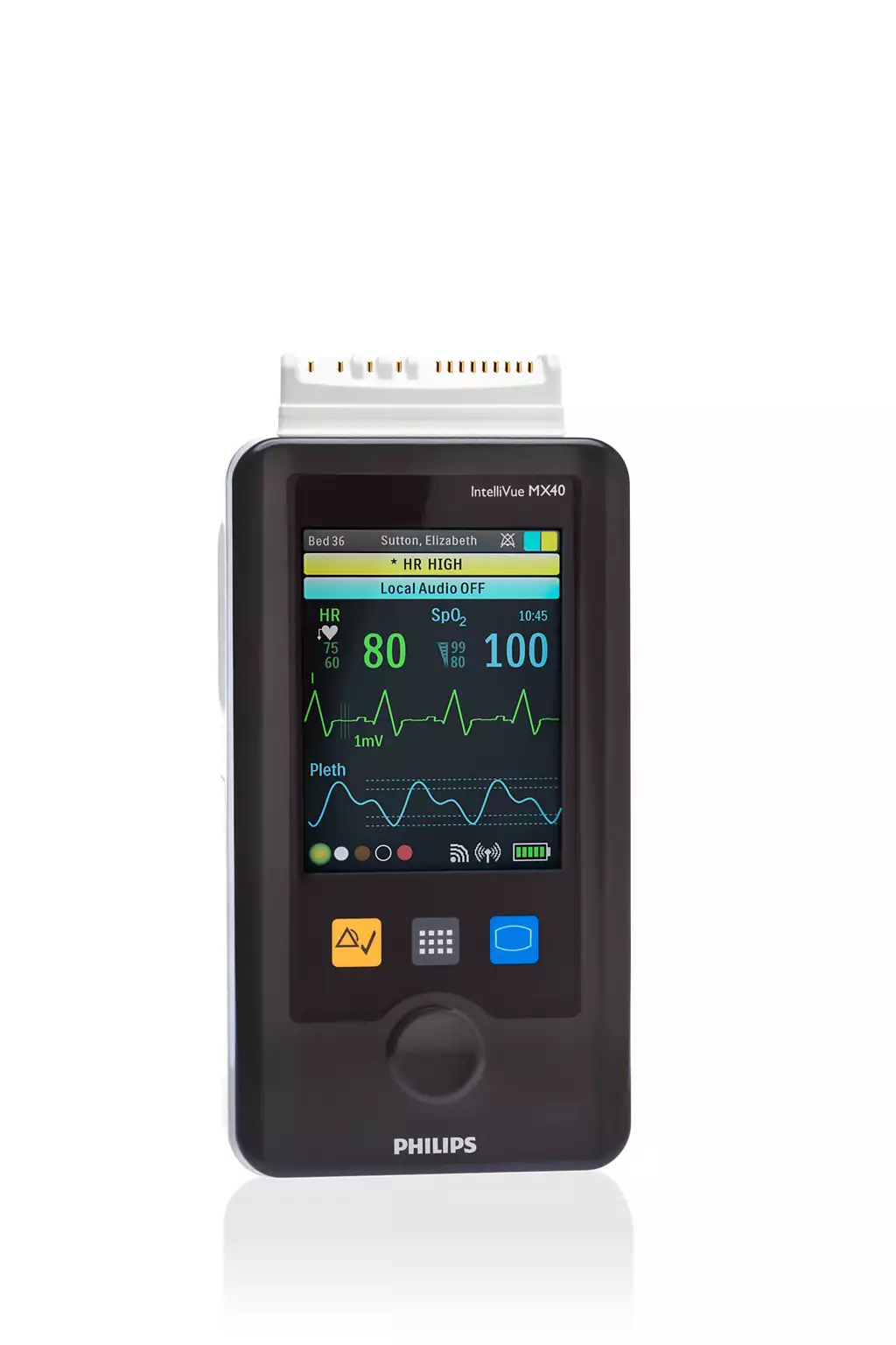
Quick answer: The Philips IntelliVue MX40 is a wearable telemetry monitor that sends ECG and optional SpO2 to the IntelliVue Information Center. Most service problems involve batteries and battery contacts, cracked housings, touchscreens, corroded ECG connector pins and speaker faults. Good battery habits and careful cleaning prevent many of them.
This guide is for biomedical teams, nurse managers and purchasing staff who support MX40 fleets.
What Is the Philips IntelliVue MX40?
The IntelliVue MX40 is a patient-worn monitor that combines continuous ECG monitoring with wireless telemetry. It measures ECG, heart rate, ST and QT, with optional SpO2 and impedance respiration, and shows them on a 2.8-inch color touchscreen. Patients can walk the unit while the central station keeps watching.
One device supports Standard, EASI and Hexad lead systems with 3-, 5- and 6-wire cables. Philips rates the MX40 IPX7 for temporary immersion, and the case is designed to withstand high-level disinfectants.
How the MX40 Connects to the Information Center
The MX40 sends data to the IntelliVue Information Center over one of three radios. The radio is fixed by the model, so every unit must match the network infrastructure your hospital already runs. If a patient leaves coverage, the MX40 keeps monitoring and alarming locally until it reconnects.
- REF 865350: 1.4 GHz Smart-hopping in the WMTS band reserved for medical telemetry
- REF 865351: 2.4 GHz Smart-hopping, which shares spectrum with Wi-Fi and Bluetooth devices
- REF 865352: 802.11 WLAN on the hospital’s own wireless network
All variants include a short-range radio that can pair the MX40 with an IntelliVue bedside monitor or cableless measurement devices. The REF number, service number, serial number and MAC address are printed on the rear label.
1. Batteries That Run Down Early
Short runtime is one of the most frequent MX40 complaints. Smart-hopping models run on three AA alkaline batteries or a Philips rechargeable lithium-ion pack, while the WLAN model uses the lithium-ion pack only. Weak cells, mixed batteries and aging packs all shorten runtime and trigger early low-battery alarms.
Why it happens
Lithium-ion packs lose capacity with age and charge cycles. Mixing AA cells with different charge levels also shortens runtime. In 2019 Philips issued a Class 2 correction because the MX40 could draw extra power and fail to give low-battery notifications, fixed with a software update.
How to avoid it
Use fresh, good-quality alkaline AAs and never mix old and new cells. Track pack age and retire packs with short runtime. Confirm every unit carries the 2019 software correction, and keep the battery door fully closed during use.
2. Charging and Battery-Contact Problems
When a rechargeable pack will not charge, or the MX40 shuts off when the battery shifts, the fault is often at the contacts rather than in the battery. Corroded or bent contacts, a cracked battery door or a damaged pack can interrupt power even when the battery itself is healthy.
Why it happens
Fluids and cleaning agents can reach the battery compartment, and leaking alkaline cells corrode contacts. Forced doors bend springs and crack latches. Dirty contacts on packs or chargers cause poor or intermittent charging.
How to avoid it
Remove AA batteries before storing units. Keep pack and charger contacts clean and dry, and inspect battery doors and latches at every PM. Take any unit with leakage residue out of service for evaluation.
3. Display and Touchscreen Failures
A blank, cracked or unresponsive touchscreen takes an MX40 out of service fast, because staff use the screen to check leads, silence alarms and confirm the patient assignment. Before sending a unit in, make sure it is not simply in standby. A two-second touch wakes the display.
Why it happens
Drops, impacts against bed rails and liquid that gets past a damaged case are the usual causes. Harsh or unapproved chemicals can also cloud or damage the screen surface over time.
How to avoid it
Use a pouch or holder, wipe the screen with Philips-approved disinfectants instead of soaking it, and check for cracks during rounds and PM. Remove any unit with a cracked screen from service.
4. ECG Connector Pin Corrosion and Lead Problems
Intermittent leads-off alarms and noisy ECG are often caused by the MX40’s front connector or the patient cable rather than electrode placement. Corroded or pitted connector pins are a common finding on the bench, and they degrade signal quality until the connector is serviced.
Why it happens
Patient fluids and cleaning agents collect in the connector, and pulling on lead wires damages contacts and the cable gasket. Once a gasket is torn, moisture reaches the pins faster.
How to avoid it
Clean the connector with the opening pointed down, using isopropyl alcohol on a lightly dampened lint-free cloth, and let the pins air dry. Inspect the gasket and contacts before each use, and disconnect by gripping the connector, never the wires.
5. Cracked Housings, Liquid Damage and Speaker Faults
Housing cracks, liquid damage and speaker faults tend to show up together. Once a case is cracked or a seal is compromised, fluid can reach the speaker, boards and battery compartment. A Speaker Malfunction message, weak alarms or random shutdowns can follow, and the unit needs evaluation.
Why it happens
Drops cause most cracks. Philips has also issued field actions involving MX40 speakers, including higher-than-expected speaker failures on units built before July 6, 2015. Later units run a speaker self-test at power-on.
How to avoid it
Remove cracked units from service and flag any liquid exposure when you send a unit in. Check your fleet’s serial numbers against Philips notices and the FDA recall database.
MX40 Symptom Quick Guide
Use this table to narrow down a fault before you pull a unit from service. Try the first step with a known-good battery and patient cable. If the symptom continues, or the unit has visible damage or liquid exposure, send it in for evaluation instead of returning it to patient use.
| Symptom | Likely cause | What to try first |
|---|---|---|
| Short runtime or early low-battery alarm | Aging pack, mixed AAs, missing software correction | Fresh pack or AAs; check software status |
| Shuts off when moved | Corroded or bent battery contacts, cracked door | Inspect contacts and door latch |
| Pack will not charge | Worn pack or dirty charger contacts | Try another pack and charger bay |
| Blank screen | Standby, failed display or power fault | Two-second touch; then swap battery |
| Leads-off or noisy ECG | Corroded connector pins or damaged cable | Try a known-good cable |
| Speaker Malfunction message | Failed speaker or detection circuit | Reinsert battery; send in if it returns |
MX40 Care Checklist
Most MX40 failures start with small habits: how batteries are handled, how connectors are cleaned and how units are stored between patients. Building these checks into daily work and annual PM catches damage early and keeps more units on the floor and fewer on the bench.
- Every patient: wipe the case with approved disinfectant, confirm patient demographics and inspect the connector gasket
- Every battery change: use fresh cells, never mix batteries and fully close the door
- Monthly: check housings, screens and battery doors for cracks, and retire weak packs
- Annually: complete PM, confirm software corrections and record REF, serial and software version
Buying Recertified vs. Repairing Your MX40
Repair usually makes sense when a unit already matches your network and the fault is isolated, such as a battery door, connector, display or speaker. Buying a recertified MX40 makes sense when you are expanding the fleet, a unit has severe liquid damage, or you need a different radio or SpO2 configuration.
- Match the REF number to your network and the service number to your SpO2 configuration (S01 ECG only, S02 active SpO2, S03 SpO2-ready hardware that needs software activation)
- IPR Medical sells recertified (refurbished) Philips IntelliVue MX40 monitors when inventory is available, covered by a 6-month or 1-year warranty depending on model
- Extended warranties are available, and every repair carries a 90-day warranty
How MX40 Repair Works at IPR Medical
IPR Medical repairs the MX40 in-house at its ISO 9001:2015 certified facility in Tustin, California, as part of our repair services for monitors and telemetry. You get a free shipping label, a free evaluation and a written estimate before any work begins on your monitor.
- Request a free FedEx or UPS shipping label through the RMA form
- Free evaluation within 1 to 2 business days of receipt
- Written estimate, with no charge until you approve the work
- Declined units returned at no cost to U.S. customers
- Repaired units tested to OEM specifications and cleaned before shipping
Philips IntelliVue MX40 FAQ
What is the Philips IntelliVue MX40 used for?
The IntelliVue MX40 is a wearable patient monitor for ambulatory patients on telemetry, step-down and progressive care units. It provides continuous ECG with ST and QT analysis, plus optional SpO2 and impedance respiration, and sends that data wirelessly to the IntelliVue Information Center so patients can walk while staying monitored.
Can an MX40 be converted from one radio type to another?
No. The radio is defined by the REF number: 865350 for 1.4 GHz Smart-hopping, 865351 for 2.4 GHz Smart-hopping and 865352 for WLAN. Units cannot be field-converted, so any replacement or added MX40 should match the REF and service number printed on the back of your existing units.
Why does my MX40 battery run down so fast?
Common causes are aging lithium-ion packs, mixed or low-quality AA cells, corroded battery contacts and units missing the 2019 Philips software correction for power consumption and low-battery notification. Start with a fresh pack or fresh AAs. If runtime stays short, have the unit evaluated.
What does a Speaker Malfunction message mean on the MX40?
It means the power-on speaker self-test did not pass. If the message returns after you remove and reinsert the battery, the speaker or its detection circuit needs service. Take the unit out of monitor-mode use, because local alarms may not be audible.
How long does an MX40 repair evaluation take?
IPR Medical evaluates units within 1 to 2 business days of receipt and sends a written estimate. No work starts and nothing is charged until you approve it. Include the REF number, serial number and any INOP message you saw to speed up diagnosis.
Need Help With an MX40?
If an MX40 is dropping off telemetry, draining batteries or showing INOP messages, IPR Medical can help. Request a free shipping label to send it in for evaluation, or call (855) 477-8866 Monday through Friday, 7:00 AM to 4:30 PM Pacific. You can also email cs@iprmed.com.
All product and manufacturer names are trademarks of their respective owners and are used only to identify equipment. IPR Medical is an independent service organization and is not affiliated with or endorsed by these manufacturers.